 a299e18e26
* Import Full Stack Asset Transfer Guide at commit fb554befdbbeff9e69159b54fce0b811603f29c7

Signed-off-by: Josh Kneubuhl <jkneubuh@us.ibm.com>

* Update the workshop with a new WORKSHOP_PATH under fabric-samples

Signed-off-by: Josh Kneubuhl <jkneubuh@us.ibm.com>

* Update the workshop with a new WORKSHOP_PATH under fabric-samples

Signed-off-by: Josh Kneubuhl <jkneubuh@us.ibm.com>

* missed a .git ignored directory on add

Signed-off-by: Josh Kneubuhl <jkneubuh@us.ibm.com>

* Updates to run the workshop on the Apple M1

Signed-off-by: Josh Kneubuhl <jkneubuh@us.ibm.com>

* Workaround for https://github.com/eslint/eslint/issues/15299 in the contract tslinter

Signed-off-by: Josh Kneubuhl <jkneubuh@us.ibm.com>

* Build an arch-specific CC images on M1

Signed-off-by: Josh Kneubuhl <jkneubuh@us.ibm.com>

* empty commit - force a build

Signed-off-by: Josh Kneubuhl <jkneubuh@us.ibm.com>

* revert an accidental commit that was building the top-level asset-transfer as arm64

Signed-off-by: Josh Kneubuhl <jkneubuh@us.ibm.com>

Signed-off-by: Josh Kneubuhl <jkneubuh@us.ibm.com>
3.9 KiB
Deploy a Fabric Network
PREV: Deploy a Kube <==> NEXT: Install Chaincode
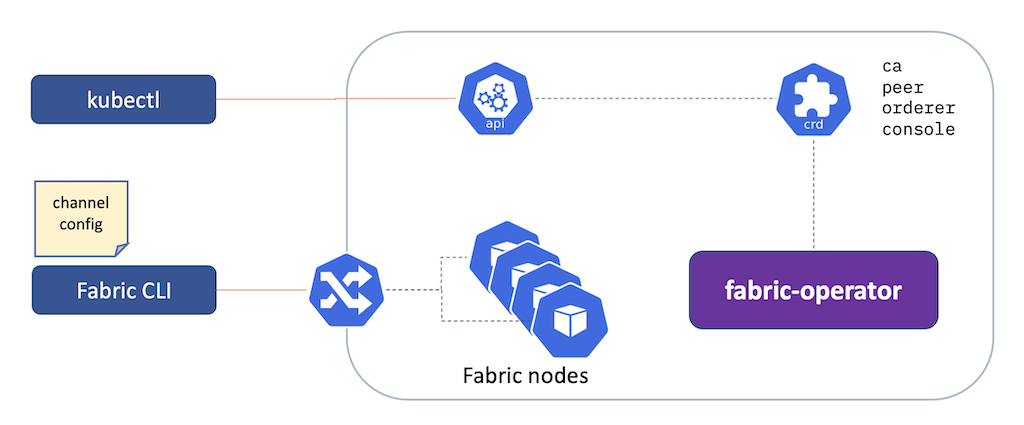
Fabric-operator extends the core Kubernetes API with a set of
custom resources suitable for
describing the nodes of a Hyperledger Fabric Network. With the operator, a set of CA,
peer, and orderer
resources are applied to the Kube API controller. In turn, the operator reflects the network as a series of Pod,
Deployment, Service, and Ingress resources in the target namespace.
After the nodes in the Fabric network have been started, the fabric peer and CLI binaries are used to connect to the
network via Ingress, preparing a channel for smart contracts and application development.
Ready?
just check-kube
Sample Network
- Install the fabric-operator Kubernetes Custom Resources
kubectl apply -k https://github.com/hyperledger-labs/fabric-operator.git/config/crd
- Apply a series of CA, peer,
and orderer resources directly to the Kube API controller. In
turn, fabric-operator will reconcile a network of Kubernetes
Pods,Deployments,Services, andIngressto reflect the target network structure.
just cloud-network
- Create a Fabric channel:
just cloud-channel
- Set the location for the network's TLS certificates, channel MSP, and user enrollments:
export WORKSHOP_CRYPTO=$WORKSHOP_PATH/infrastructure/sample-network/temp
Post Checks
curl \
  -s \
  --cacert $WORKSHOP_CRYPTO/cas/org1-ca/tls-cert.pem \
  https://$WORKSHOP_NAMESPACE-org1-ca-ca.$WORKSHOP_INGRESS_DOMAIN/cainfo \
  | jq
Kube Navigation and Peer Logs
To watch the peer logs throughout the workshop, we'll need to identify the pod name for one of the peers, let's find the pod name for org1-peer1 by using kubectl.
Set the default namespace to test-network so that we don't have to pass the namespace (-n) to each kubectl command:
kubectl config set-context --current --namespace=test-network
kubectl get pods
You'll see the org1-peer1 pod with a name like org1-peer1-79df64f8d8-7m9mt, your pod name will be different!
We can then tail the org1-peer1 log in a terminal window so that we can see proof that chaincodes get deployed, blocks get created, etc:
kubectl logs -f org1-peer1-79df64f8d8-7m9mt peer
Now that you know how to use kubectl, let's learn the shortcut! You can easily monitor all of the the pods in the k9s utility. If you haven't started k9s yet, start it in a new terminal:
k9s -n test-network
You'll see the fabric-operator, peer, orderer, and CA pods. Navigate around by hitting ENTER on one of the pods, ENTER again on one of the containers, and then hit 0 to tail the container's log. Go back up by hitting ESCAPE. More tips are available at the top of the k9s user interface.
Troubleshooting
# While running "just cloud-network and/or just cloud-channel":
tail -f infrastructure/sample-network/network-debug.log
Take it Further:
- Deploy the Fabric Operations Console
- Build a network with the Ansible Blockchain Collection