 f2939e29c6
Signed-off-by: Simon Stone <sstone1@uk.ibm.com> Change-Id: I3de1927a67723044899dce7ec22d4e46e4c6b944 |
||
|---|---|---|
| .. | ||
| organization | ||
| roles | ||
| README.md | ||
Commercial Paper Tutorial
This folder contains the code for an introductory tutorial to Smart Contract development. It is based around the scenario of Commercial Paper. The full tutorial, including full scenario details and line by line code walkthroughs is in the Hyperledger Fabric documentation.
Scenario
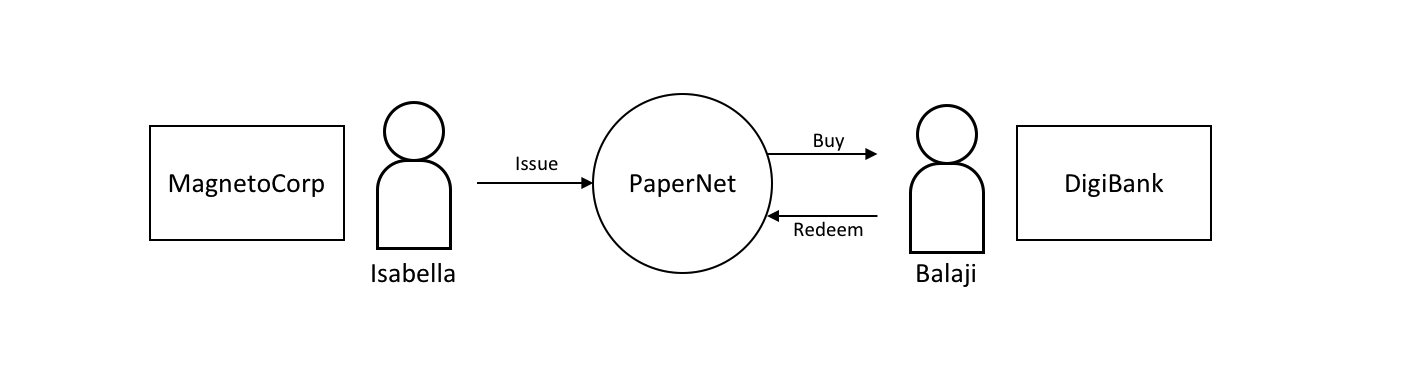
In this tutorial two organizations, MagnetoCorp and DigiBank, trade commercial paper with each other using PaperNet, a Hyperledger Fabric blockchain network.
Once you’ve set up a basic network, you’ll act as Isabella, an employee of MagnetoCorp, who will issue a commercial paper on its behalf. You’ll then switch hats to take the role of Balaji, an employee of DigiBank, who will buy this commercial paper, hold it for a period of time, and then redeem it with MagnetoCorp for a small profit.
Quick Start
You are strongly advised to read the full tutorial to get information about the code and the scenario. Below are the quick start instructions for running the tutorial, but no details on the how or why it works.
Steps
-
Start the Hyperledger Fabric infrastructure
although the scenario has two organizations, the 'basic' or 'developement' Fabric infrastructure will be used
-
Install and Instantiate the Contracts
-
Run client applications in the roles of MagnetoCorp and Digibank to trade the commecial paper
- Issue the Paper as Magnetocorp
- Buy the paper as DigiBank
- Redeem the paper as DigiBank
Setup
You will need a a machine with the following
- Docker and docker-compose installed
- Node.js v8 if you want to run Javascript client applications
- Java v8 if you want to run Java client applications
- Maven to build the Java applications
It is advised to have 3 console windows open; one to monitor the infrastructure and one each for MagnetoCorp and DigiBank
If you haven't already clone the repository to a directory of your choice, and change to the commercial-paper directory
git clone https://github.com/hyperledger/fabric-samples.git
cd fabric-samples/commercial-paper
This README.md file is in the the commercial-paper directory, the source code for client applications and the contracts ins in the ogranization directory, and some helper scripts are in the roles directory.
Running the Infrastructure
In one console window, run the ./roles/network-starter.sh script; this will start the basic infrastructure and also start monitoring all the docker containers.
You can cancel this if you wish to reuse the terminal, but it's best left open.
Install and Instantiate the contract
The contract code is available as either JavaScript or Java. You can use either one, and the choice of contract language does not affect the choice of client langauge.
In your 'MagnetoCorp' window run the following command
./roles/magnetocorp.sh
This will start a docker container for Fabric CLI commands, and put you in the correct directory for the source code.
For a JavaScript Contract:
docker exec cliMagnetoCorp peer chaincode install -n papercontract -v 0 -p /opt/gopath/src/github.com/contract -l node

docker exec cliMagnetoCorp peer chaincode instantiate -n papercontract -v 0 -l node -c '{"Args":["org.papernet.commercialpaper:instantiate"]}' -C mychannel -P "AND ('Org1MSP.member')"
For a Java Contract:
pushd ./organization/magnetocorp/contract-java

./gradlew installDist

popd

docker exec cliMagnetoCorp peer chaincode install -n papercontract -v 0 -p /opt/gopath/src/github.com/contract-java/build/install/papercontract -l java

docker exec cliMagnetoCorp peer chaincode instantiate -n papercontract -v 0 -l java -c '{"Args":["org.papernet.commercialpaper:instantiate"]}' -C mychannel -P "AND ('Org1MSP.member')"
If you want to try both a Java and JavaScript Contract, then you will need to restart the infrastructure and deploy the other contract.
Client Applications
Note for Java applications you will need to compile the Java Code using maven. Use this command in each application-java directory
mvn clean package
Note for JavaScript applications you will need to install the dependencies first. Use this command in each application directory
npm install
Note that there is NO dependency between the langauge of any one client application and any contract. Mix and match as you wish!
Issue the paper
This is running as MagnetoCorp so you can stay in the same window. These commands are to be run in the
commercial-paper/organization/magnetocorp/application directory or the commercial-paper/organization/magnetocorp/application-java
Add the Identity to be used
node addToWallet.js
# or
java -cp target/commercial-paper-0.0.1-SNAPSHOT.jar org.magnetocorp.AddToWallet
Issue the Commercial Paper
node issue.js
# or
java -cp target/commercial-paper-0.0.1-SNAPSHOT.jar org.magnetocorp.Issue
Buy and Redeem the paper
This is running as Digibank; you've not acted as this organization before so in your 'Digibank' window run the following command in the
fabric-samples/commercial-paper/ directory
./roles/digibank.sh
You can now run the applications to buy and redeem the paper. Change to either the
commercial-paper/organization/digibank/application directory or commercial-paper/organization/digibank/application-java
Add the Identity to be used
node addToWallet.js
# or
java -cp target/commercial-paper-0.0.1-SNAPSHOT.jar org.digibank.AddToWallet
Buy the paper
node buy.js
# or
java -cp target/commercial-paper-0.0.1-SNAPSHOT.jar org.digibank.Buy
Redeem
node redeem.js
# or
java -cp target/commercial-paper-0.0.1-SNAPSHOT.jar org.digibank.Redeem